Managing your money starts with knowing where it goes. Whether you’re trying to stick to a monthly budget, cut down on impulse spending, or finally build an emergency fund, an expense tracker app can be the game-changer you need.
The best iOS expense tracker apps do more than log numbers — they give you clear spending insights, smart budget breakdowns, and visual reports that make personal finance feel less like a chore. All from your iPhone.
Financial experts often say that awareness is the first step to better money habits. Tracking expenses makes you aware in real time, which means fewer surprises at the end of the month.
In this guide, we’ll explore the best expense tracker apps for iOS, covering everything from simple manual logging to smart AI-powered budgeting tools.
Why Use an Expense Tracker App?
Before jumping in, here’s why these apps are worth it.
A good expense tracker app helps you:
- See exactly where your money is going
- Set and stick to monthly budgets
- Spot wasteful subscriptions and recurring bills
- Build savings goals with clear progress tracking
- Make better decisions with spending reports
The best apps also use visual tools like charts, category breakdowns, and spending alerts to keep you informed without overwhelming you.
You can use them to track:
- Groceries and dining out
- Rent, bills, and subscriptions
- Entertainment and shopping
- Savings goals and debt repayment
- Travel and daily commute expenses
Now let’s look at the top expense tracker apps for iOS.
Top 5 Best Expense Tracker Apps for iOS
1. BudgetIt — Expense Tracker & Budget Planner
App Store: Download BudgetIt
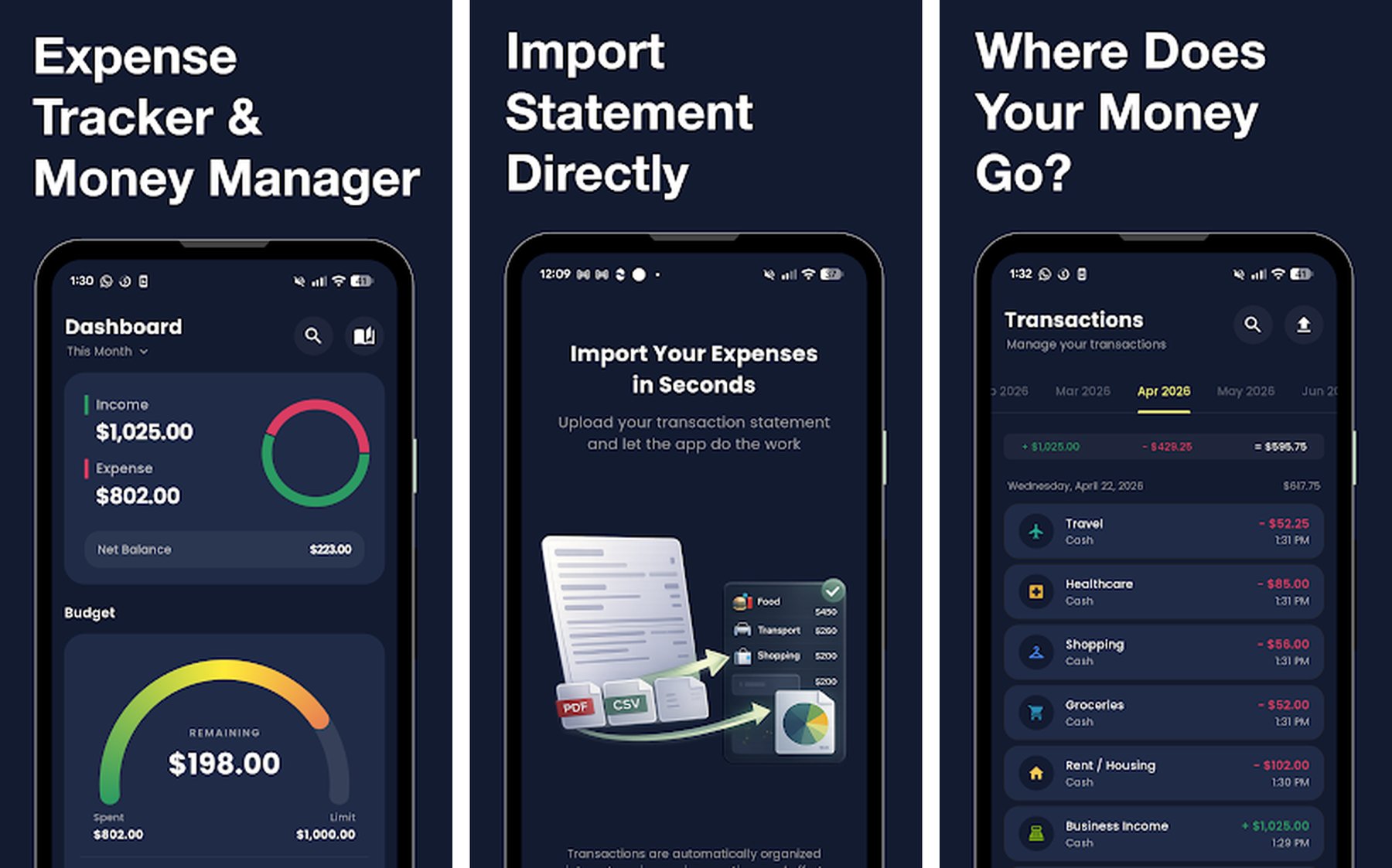
BudgetIt is a clean and intuitive expense tracker built for people who want real clarity over their spending. Instead of connecting banks or dealing with complex setup, BudgetIt lets you upload your statements and get instant spending breakdowns — no hassle, no friction.
What makes it stand out is how BudgetIt turns raw transaction data into actionable insights. You can see your top spending categories at a glance, compare month-over-month trends, and actually understand your financial habits instead of just logging numbers.
Key Features
- Upload bank statements for instant analysis
- Smart spending categorization
- Monthly budget tracking with visual breakdowns
- Spending insights and trend reports
- Clean, minimal interface designed for daily use
- Privacy-first — no bank login required
Why BudgetIt Stands Out
Many expense trackers require you to hand over banking credentials or set up complex integrations. BudgetIt skips all of that. Upload a statement, get your insights immediately. It’s built for people who want to understand their finances without jumping through hoops.
This approach makes it ideal for:
- Users who value privacy over automation
- People who want fast, no-fuss budget tracking
- Anyone starting their personal finance journey
Best For
- People who want simple, private expense tracking
- iOS users who prefer manual control over bank syncing
- Anyone who wants clear spending insights fast
2. Spendee — Budget & Money Tracker
App Store: Download Spendee
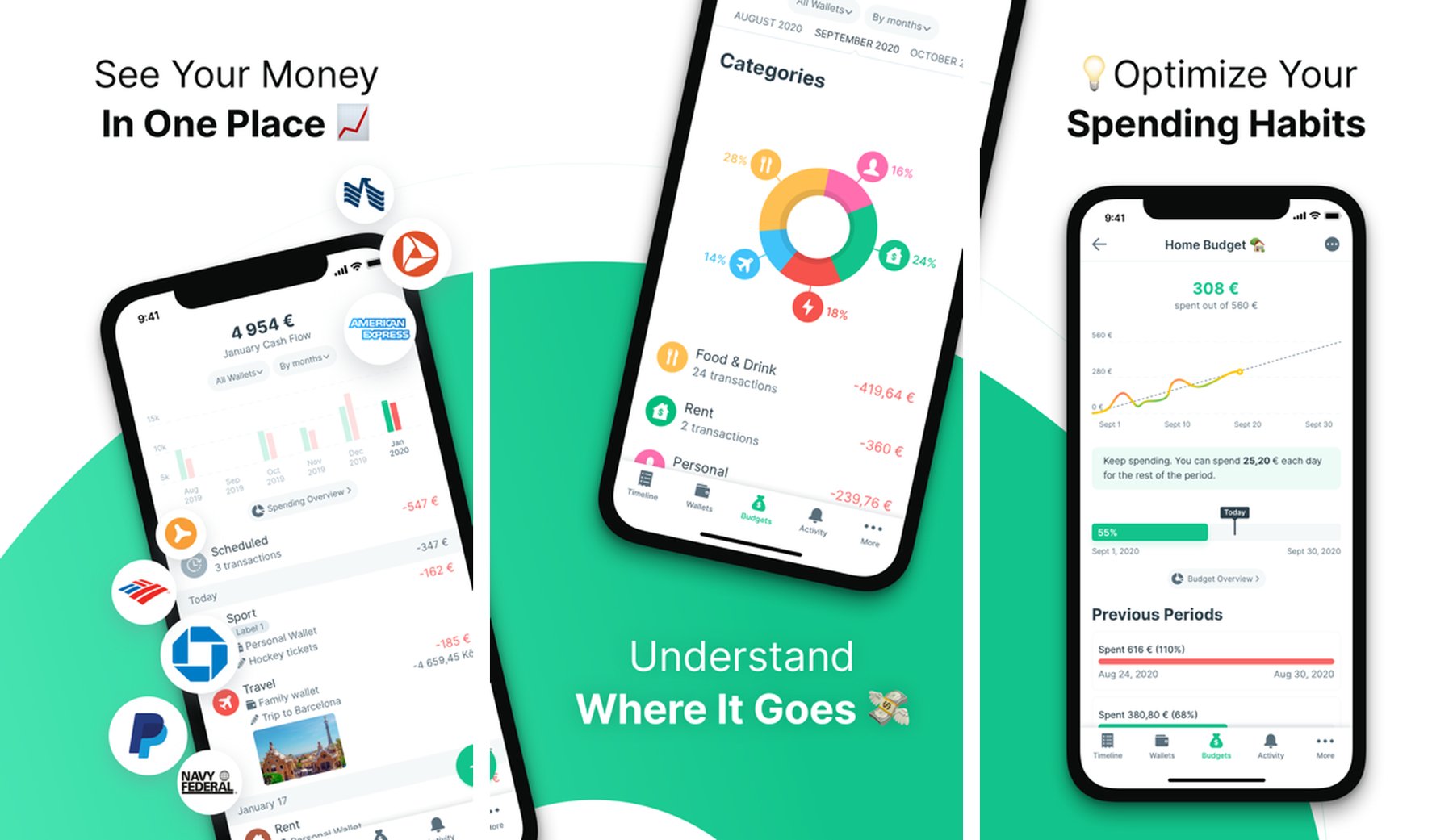
Spendee is a beautifully designed budgeting app loved by nearly 3 million users worldwide. It combines expense tracking with smart budgeting tools, giving you a clear picture of your financial life through elegant charts and intuitive category management.
It supports bank synchronization (connecting to thousands of institutions worldwide), making it easy to track all your accounts in one place automatically. You can also log cash expenses manually for a complete view of your spending.
Key Features
- Bank account and e-wallet synchronization
- Smart expense categorization with colorful visuals
- Shared wallet for couples and families
- Crypto wallet support (Coinbase and others)
- Budget planning with spending alerts
- Detailed spending reports and graphs
- Available in multiple currencies
Why Spendee Stands Out
Spendee’s shared wallet feature sets it apart from most competitors. Couples, roommates, or families can track shared expenses together — perfect for splitting bills or planning a joint vacation budget. The app’s visual design is also noticeably polished compared to most finance apps.
Best For
- Couples or roommates sharing expenses
- Users who want bank sync + beautiful visuals
- International users tracking multiple currencies
3. Money Manager Expense & Budget
App Store: Download Money Manager
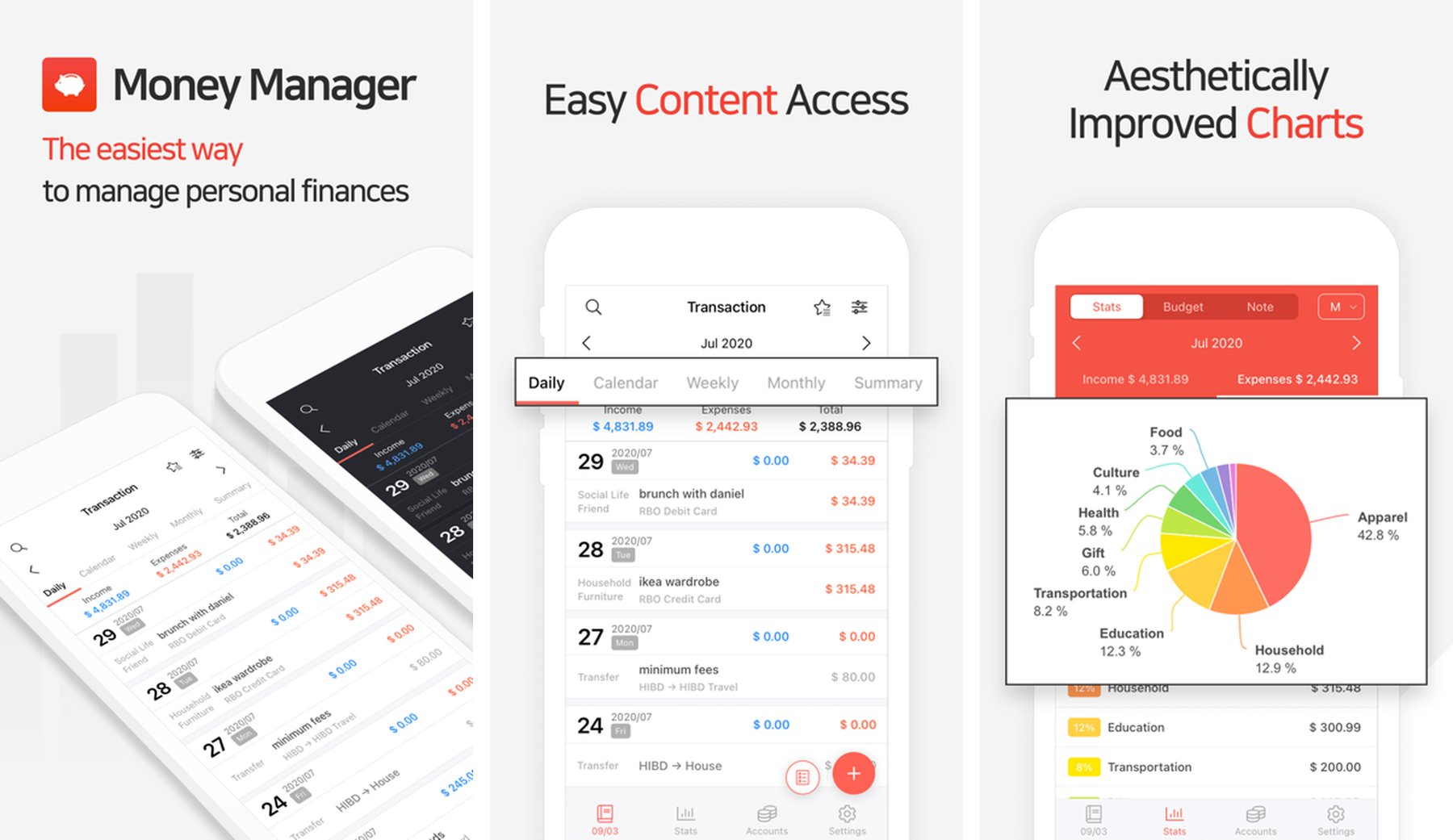
Money Manager is one of the most feature-complete personal finance apps on the App Store, with a 4.8-star rating built over years of refinement. It combines detailed expense tracking with comprehensive account management, giving power users a full view of their financial picture.
It supports multiple accounts — bank accounts, cash, credit cards, and more — and provides detailed analysis by day, week, month, and year. If you want granular control over every dollar, Money Manager delivers.
Key Features
- Multiple account management (cash, bank, credit card)
- Detailed income and expense tracking by category
- Budget setting with limit alerts
- Calendar view of daily spending
- Asset and liability tracking
- Passcode and biometric security
- Backup and restore functionality
Why Money Manager Stands Out
The depth of reporting in Money Manager is exceptional. You can slice your spending data by any time period, compare income vs. expenses visually, and even track assets and liabilities to get a true net worth snapshot. It’s the closest thing to a personal accountant in app form.
Best For
- Power users who want detailed financial tracking
- People managing multiple accounts and assets
- Users who prefer comprehensive reports over simplicity
4. Wallet — Budget & Money Manager by BudgetBakers
App Store: Download Wallet
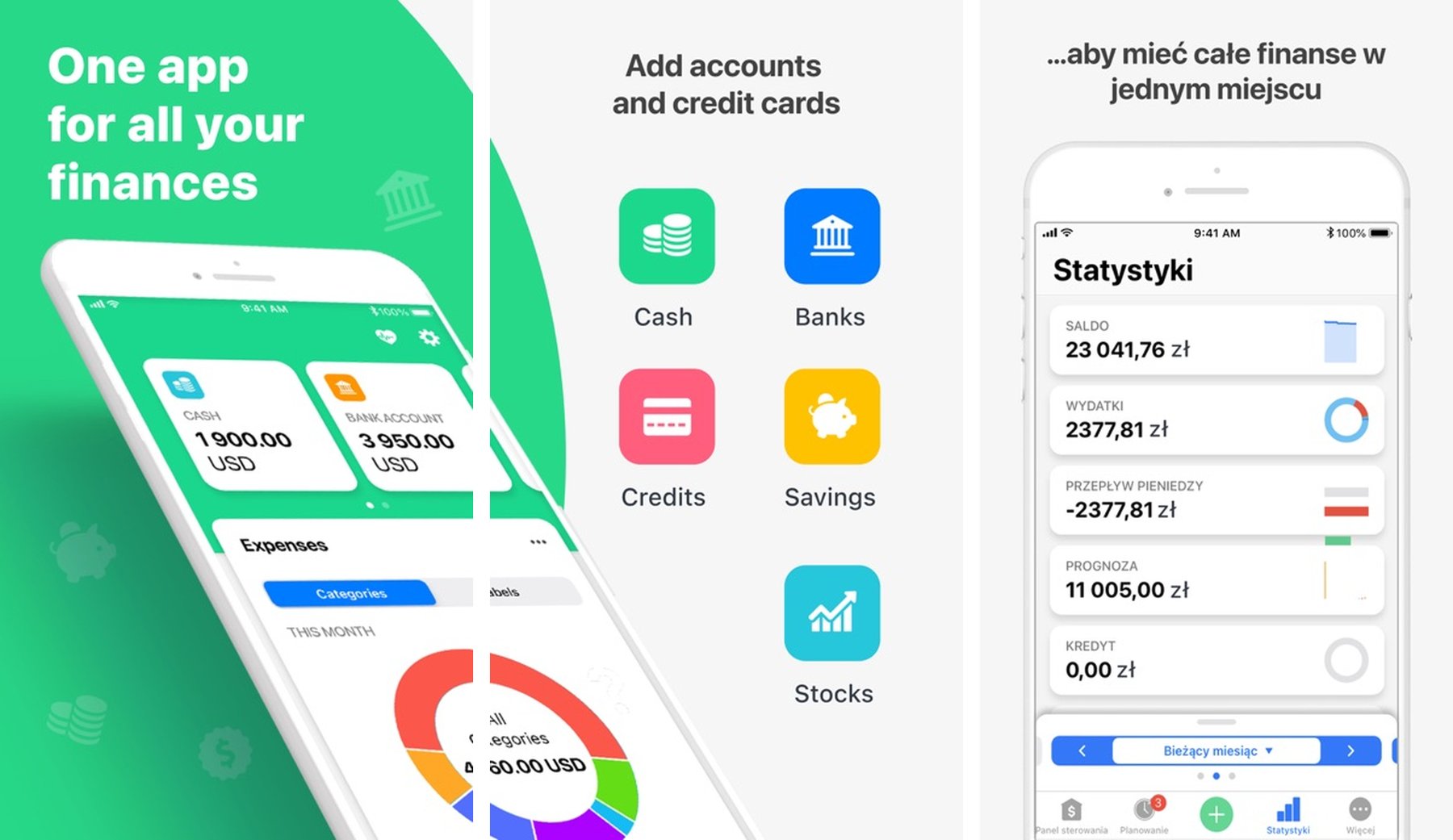
Wallet by BudgetBakers is a market-leading personal finance app that connects to over 4,000 banks worldwide, giving you a fully automated view of all your accounts in one place. With a 4.6-star rating and millions of downloads, it’s one of the most trusted budgeting apps in the App Store.
The app shines at automatic transaction import and categorization, saving you the work of manual logging. It also includes powerful debt tracking, bill reminders, and shared budget features for households managing finances together.
Key Features
- Bank sync with 4,000+ financial institutions globally
- Automatic expense categorization
- Debt tracking and repayment planning
- Bill and subscription reminders
- Shared budgets for families or partners
- Net worth tracking across accounts
- Cross-platform sync (iOS, Android, Web)
Why Wallet Stands Out
Wallet’s combination of global bank connectivity and cross-platform support makes it a go-to for anyone managing money across multiple institutions or devices. The debt tracking feature is especially strong — you can plan repayment schedules and track progress visually.
Best For
- Users who want fully automated expense tracking
- People with multiple bank accounts to consolidate
- Families managing shared household budgets
5. Goodbudget — Budget Planner
App Store: Download Goodbudget
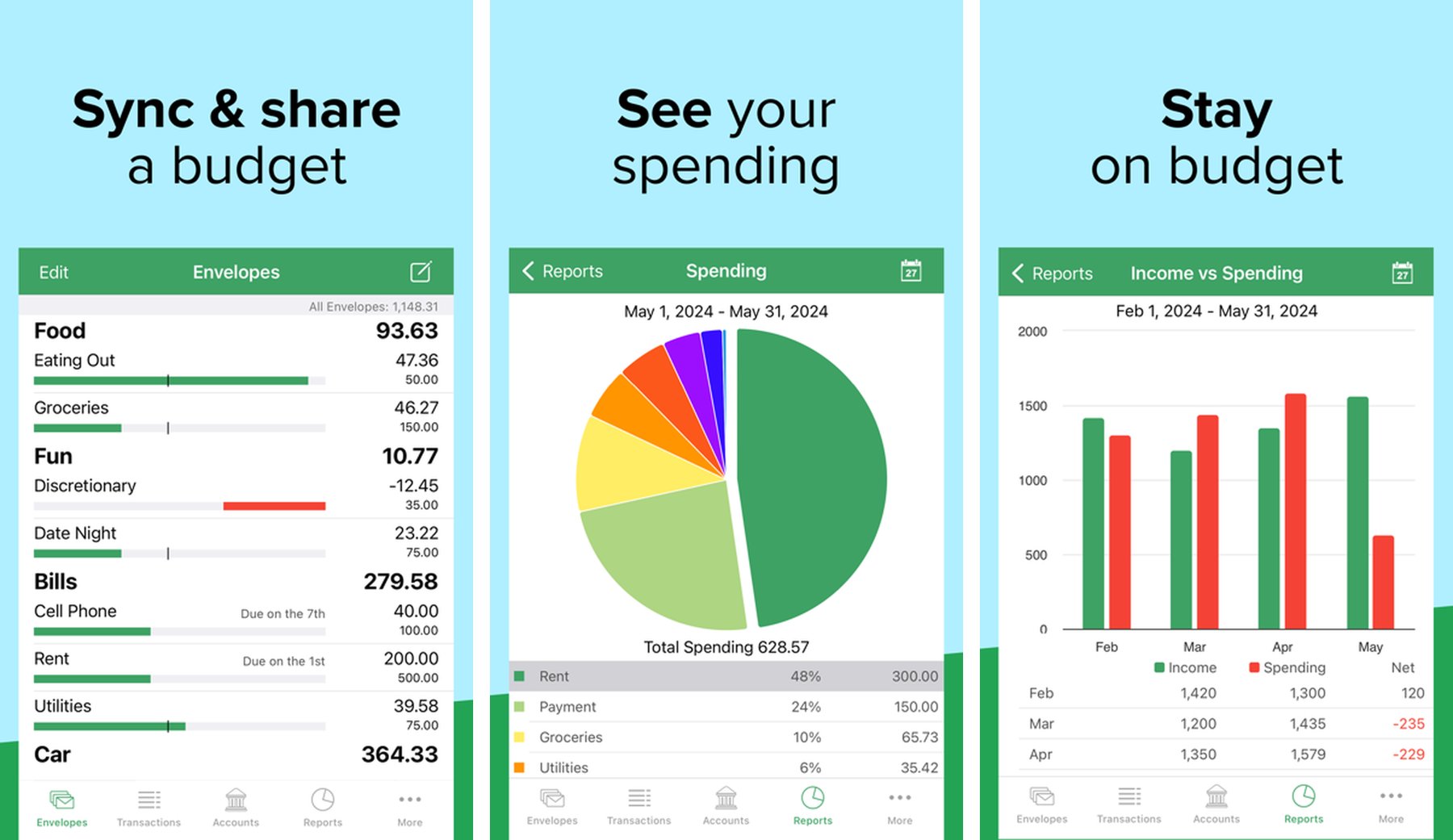
Goodbudget brings the classic envelope budgeting method to your iPhone. Instead of tracking what you’ve spent, you plan your spending upfront by allocating money into virtual envelopes for each category — groceries, rent, entertainment, and more. When the envelope is empty, you know you’re done spending in that category.
This proactive budgeting approach is backed by decades of personal finance advice and is especially powerful for people who struggle with overspending. Goodbudget also lets you sync across multiple devices and share budgets with a partner.
Key Features
- Envelope budgeting system
- Real-time sync across iPhone, Android, and Web
- Shared envelopes for couples and families
- Debt tracking with payoff scheduling
- Spending reports and trend tracking
- No bank account linking required
- Free tier with 20 envelopes; paid plan for unlimited
Why Goodbudget Stands Out
The envelope method works because it creates hard mental limits on each spending category. Instead of tracking regret after the fact, you’re making intentional decisions upfront. For anyone who has tried traditional budgeting apps and found them too reactive, Goodbudget’s method offers a fundamentally different and more proactive approach.
Best For
- People who want to budget proactively, not reactively
- Couples who want to sync and plan budgets together
- Anyone following a zero-based or envelope budgeting system
How to Choose the Best Expense Tracker App for iOS
The right app depends on your budgeting style.
Choose BudgetIt if you want
- Quick spending insights from bank statements
- No bank login required — full privacy
- A clean, minimal interface for daily use
Choose Spendee if you want
- Automatic bank sync with beautiful visuals
- Shared expenses with a partner or family
- Multi-currency tracking for travel or international use
Choose Money Manager if you want
- Granular control over every transaction
- Multi-account management with detailed reports
- An all-in-one financial overview including assets
Choose Wallet by BudgetBakers if you want
- The widest global bank connectivity (4,000+ banks)
- Fully automated transaction import
- Shared family budgets with cross-platform sync
Choose Goodbudget if you want
- A proactive, envelope-based budgeting approach
- Budget planning without linking a bank account
- Partner sync and zero-based budgeting
Tips to Manage Your Expenses Successfully
Even the best expense tracker app cannot fix spending habits on its own. The real change happens when you stay consistent and act on what the data tells you.
Log Expenses Daily
The biggest advantage of a tracker is real-time awareness.
Whether you log manually or rely on bank sync, reviewing your expenses daily keeps you from being surprised at the end of the month.
Set a Budget Before the Month Starts
Don’t just track — plan.
Decide upfront how much you’ll spend on groceries, dining, entertainment, and other categories. Then use your app to see if you’re staying on track.
Review Weekly, Not Just Monthly
Most overspending happens gradually across the week.
A quick 5-minute weekly check-in is more effective than a once-a-month review when it’s too late to course-correct.
Start With Your Three Biggest Categories
Don’t try to optimize everything at once.
Find the top three categories where you spend the most — usually food, subscriptions, and entertainment — and focus there first. Small cuts in big categories add up fast.
Final Thoughts
Expense tracker apps are one of the most practical tools for improving your financial health.
By consistently logging and reviewing your spending, you can cut waste, grow savings, and reduce the stress that comes from not knowing where your money goes.
If you’re looking for the best expense tracker apps for iOS, these five are excellent choices:
- BudgetIt – Statement-based insights, no bank login required
- Spendee – Beautiful design with bank sync and shared wallets
- Money Manager – Feature-rich tracker for power users
- Wallet by BudgetBakers – Global bank sync with family sharing
- Goodbudget – Proactive envelope budgeting system
Each takes a slightly different approach to personal finance, so the best choice depends on your style and goals.
Start tracking today, and within a month you’ll have the data to make smarter financial decisions.
Ready to take control of your spending without linking a bank account?
Try BudgetIt — upload your statement, get instant spending insights, and start building better money habits today.